Sharing Issues
Last updated: October 2, 2026
Shareable issue links create a public, read-only page for one or more issues. Anyone with the link can view screenshots, severity, status, and description without logging in. Use them to share findings with teammates, clients, or stakeholders who don't have OverlayQA.
Create a Share Link
- Open the OverlayQA sidebar on any page with issues.
- Select one or more issues using the checkboxes in the issue list.
- Open the Actions dropdown and click Share issues.
A sheet appears asking you to set the link expiration:
| Option | Duration |
|---|---|
| 7 days | Link expires one week from creation. |
| 30 days (default) | Link expires one month from creation. |
| 90 days | Link expires three months from creation. |
Click Create Share Link. The confirmation shows the URL with a Copy Link button and an Open button to preview the public page.
What the Public Page Shows
The share page displays a snapshot of the selected issues at the time the link was created. Each issue shows:
- Title and description.
- Severity (critical, high, medium, low).
- Status (open, in progress, resolved, verified, closed).
- Type (design bug, design gap, design debt, accessibility).
- Screenshot of the reported element or area.
- Page URL where the issue was found.
- Labels applied to the issue, so stakeholders see the same categories your team uses.
Note: Share pages are excluded from search engine indexing (noindex, nofollow). They are designed for private sharing, not public discovery.
Managing Share Links
View and manage all share links from the extension sidebar. Each link shows the number of shared issues, creation date, and expiration status.
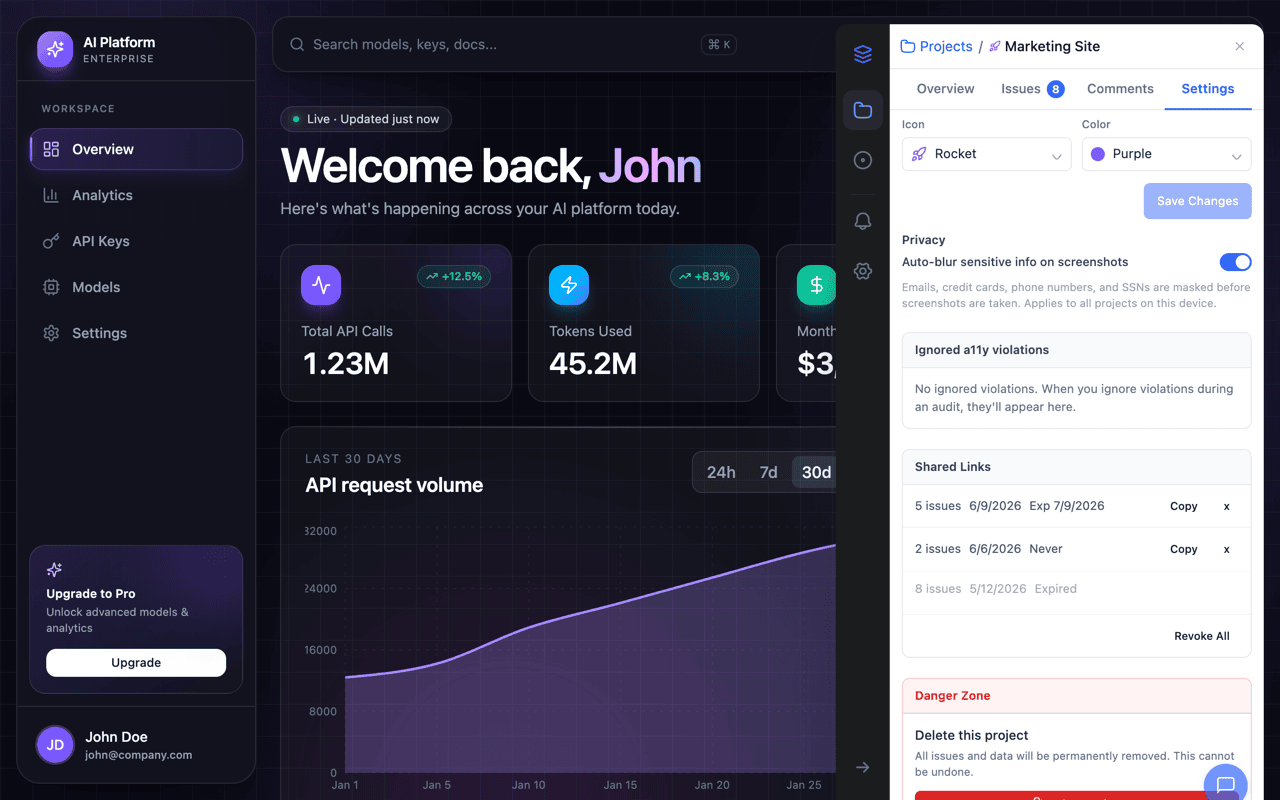
- Copy: Copy the share URL to your clipboard.
- Revoke: Immediately disable access. The link shows an "expired" page.
- Revoke All: Revoke all active share links for a project at once.
Once a link expires or is revoked, anyone visiting it sees an expiration page. There is no way for expired links to be reactivated.
Availability
Shareable issue links are available on all plans, including the free tier. There is no limit on the number of share links you can create.